You bought HubSpot, the licenses are paid, and a few months later your team still keeps its own lists in Excel. The reports exist, but nobody opens them, because nobody trusts the numbers. This is the most common situation we see when companies come to us, and it rarely has anything to do with the software.
A HubSpot implementation sets up HubSpot so it shows how one specific company sells and serves its customers, and gets the team working in it every day. It works when the real process is understood before anything is built, and when the team uses each part as soon as it is live. This guide walks through each step, with examples from our own client projects. Client names are left out.
The short version
- Find the real constraint before you fix the list of symptoms.
- Write down the process and agree on it before anything is built.
- Decide field by field what happens to your existing data before you migrate or sync it.
- Let the team click through a working prototype early in the build.
- Test the whole process with one test customer, in short loops.
- Train one process at a time, right after it is built.
- After go live, check that each part is actually used.
Why do HubSpot implementations fail?
Most of them fail because HubSpot was set up the standard way and never shaped around the business. The software works. It just doesn’t show what this particular team needs to see.
We see this in very different industries. Everyone keeps their own list next to the CRM, and the numbers that matter are in those lists. The lists are updated by hand and drift apart. The HubSpot reports can’t show that data, so nobody opens them.
The list views and the customer records still look the way they did on the first day. A property management company wants to see buildings and tenants, but contacts and deals alone don’t get them far. A manufacturer keeps its orders in the ERP, and when a dealer calls, sales has to jump between two systems to answer a simple question. Whatever the team needs before the next call is not on the screen, so it ends up in a spreadsheet.
The fix starts with the process, not the settings. Go through it from the first contact to the invoice, and at each step ask what happens next and what the responsible person needs to see. That decides which data belongs in HubSpot and what the views and record pages show.
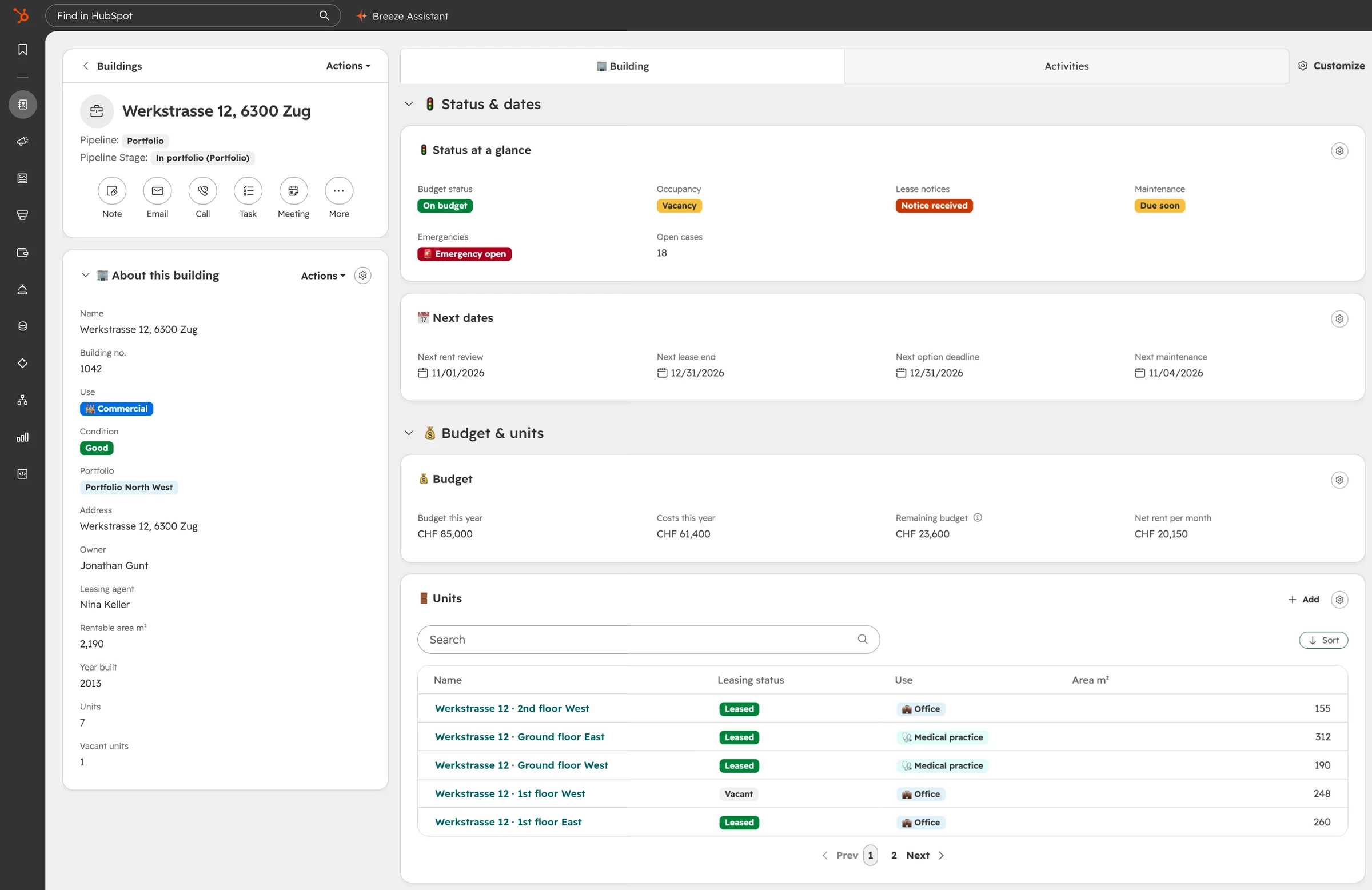
If your team keeps its own lists next to HubSpot, book a call with us and we’ll go through where the process and the system drift apart. The setup decisions that cause this most often are collected in 10 mistakes HubSpot beginners make.
Is the problem on your list the real one?
Usually not. The list of problems is often true, but fixing it on the wrong foundation leaves HubSpot underused and the team in their sheets.
Most companies come to us with a list. The tracking from Google doesn’t work, a few automations fail or create errors. The actual problem usually shows up when you go through how the company really sells.
In one project, the company had hired additional sales reps to take over the leads their two most experienced salespeople no longer had time for. Those two had everything in their heads, and when that wasn’t enough, they built their own Excel lists. The new reps had nothing like that to work from. For more than a year they didn’t close a single deal, so the company was paying salaries that brought in no revenue. The CRM had never been set up to show what matters in this business.
In another project, a startup founder was about to buy Marketing Hub Professional. Marketing was his number one priority, but no campaigns or marketing assets existed yet, and there was no plan for who would build them. Meanwhile more than a hundred new contacts were about to come in, all in notes and Excel lists. The real constraint was that nobody had a clear way to work through those contacts until they became deals. Marketing automation at that point would have left the leads waiting.
| What the client asked for | What the real constraint was | What came first |
|---|---|---|
| Fix the Google tracking and the failing automations | New reps had nothing to work from, the know how sat in two people’s heads and Excel lists | Rebuilding the funnel around how the company really sells |
| Buy Marketing Hub Professional | More than a hundred new contacts with no clear way to work them into deals | Getting the team into HubSpot, follow up emails as sequences in Sales Hub Professional |
So before you buy more hubs or fix the next automation, map the process with the people who do the work and look for the one step where things really get stuck.
What needs to be agreed before the build starts?
How each step of the process works and what happens to your existing data. Both are cheap to fix on paper and expensive to fix after go live.
The worst case in a CRM project is that everything is in place, and only then the client notices they imagined it differently. In one of our projects the CEO wanted the follow up emails to keep running. His business partner wrote: switch them off. Both had answered the same question in our workbook, before a single workflow was built. Without that step, the disagreement might only have appeared after go live.
A written process with open questions also keeps the project moving. Otherwise one unanswered question can stop a project for two weeks, while calls get scheduled to approve parts or to ask about a field an automation needs.
Your data needs the same decision before it moves. In one project the client came from Creatio. Before anything moved, we cleaned up the old data together and decided which data was worth taking over, and only that went into HubSpot. The switch went smoothly. Today every migration and every sync starts with a mapping sheet: for each field, the client decides with us whether it stays, gets rebuilt or goes, and signs it off before anything is built.
Integrations need the same decision for every field that crosses between systems. Two concrete examples are our articles on HubSpot and QuickBooks and Cin7 and HubSpot.
When should the team first see their new CRM?
Early in the build, as a working prototype of their own process. Your team shouldn’t have to imagine their new CRM for weeks.
In many projects the system lives on paper until shortly before go live. Fields and stages get discussed in theory, and the team sees the real thing at the end. That’s when they notice what doesn’t fit. We used to work that way too. On bigger projects, setting up the fields alone took days, so clients saw their system late.
Today a working prototype takes minutes once the process is agreed. It’s a test setup in your own portal or in a sandbox, with realistic data, that the team can click through. One client’s team has to renew customer contracts before they run out. Early in the build they saw a prototype with their first views and test records, and for the first time they could see that the project was heading in the right direction.
A simple check for any CRM project: early in the build, can your team already click through a prototype of their own process in HubSpot?
How do you test a HubSpot implementation?
Walk one test customer through the whole process while it is being built, and let the team click through each process before it counts as done. The worst time to find an edge case in a CRM is after it’s built.
If the whole system is built first and tested at the end, the edge cases show up at the end too. Fixing them then means long rounds of changes, sometimes even in the data model.
The better order is a prototype of the whole process with one test customer, from the first deal to the renewal and to the case where they don’t renew. With one of our clients, two edge cases came up during that demo. One was a company with several separate contracts, which the team still wants to see in one place. The other was a customer with a gap year between two contracts. Both could be fixed before any data was imported.
After that, each process gets a short video that walks through the steps and a test checklist. Everyone on the team clicks through the process once and notes what happened. You test in short loops, and there is no big bang at the end where nothing works.
How should the team be trained on HubSpot?
One process at a time, right after that process is built. One big training at the end means half of it is forgotten by the time people need it.
Where a training starts depends on how well the team already knows HubSpot. If they have never worked with it, we begin with the basics: how to navigate, what objects are, why there are contacts, companies and deals, and what it means when records are associated with each other. Then come table and board views, filters and search, so people find the right records, and the record page itself.
Once the basics sit, we go through the process together and walk one example customer through the whole pipeline. One or two sessions are usually enough. We click through the process ourselves while the team watches, because when someone else takes the mouse and gets stuck, it gets unclear for everyone watching.
After that the team needs concrete tasks to practice, for example entering their active deals by hand and keeping the status up to date. That way they repeat with real data, and much more often, what we simulated in the session. The specific questions usually come up exactly there, and we answer them in a follow up session or by email in between.
In one project the two experienced salespeople moved their 46 deals into HubSpot over a weekend after the first training, and they now work in it every day.
What happens after go live?
The system is live, and in daily work a view or a step turns out not to fit. A project is only done when the team actually uses what was built.
Hypercare starts once the system is live and the team knows the basics and their processes. During real daily work we meet with the team regularly, adjust the processes in HubSpot and fix errors or missing steps that nobody noticed in the workshops. The point of this phase is that the team is not left alone: they have a direct line to us and regular sessions to clear open questions and improve the system.
In one of our projects the front of the process was used from day one: new leads came in, and the team worked them in HubSpot. The back was not. Won annual contracts were in the system, but nobody had linked them to the renewal tracking, because that was one manual step nobody had made part of their routine. On paper the feature was delivered. In practice nobody could see when those contracts would run out.
That’s why the weeks after go live need a usage check: three or four numbers per process that show whether it is used, and a short training or a small fix wherever it isn’t.
FAQ
How long does a HubSpot implementation take?
On average four to six weeks from the blueprint workshop to go live, as long as there are no delays on the client side. The biggest factor is how quickly open questions get answered and data gets delivered, which is why the process and the data are agreed before the build.
Who needs to be involved?
The person who decides, from the kickoff on, and the people who will work in the system every day. If the decision maker only sees the system in the final training, the first real feedback comes after go live.
What does a HubSpot implementation cost?
It depends on the process, the data and the integrations, so the scope and a fixed price are set after the blueprint workshop, and everything listed in the offer is included in that price. As a guide from our projects:
| Scope | What it typically includes | Range |
|---|---|---|
| Simple setup | One pipeline, standard objects, CSV import, one training | from $6,000 |
| Most projects | Several processes, a migration or one integration, a training per process | $10,000 to $18,000 |
| Complex projects | Several integrations, ERP connection, custom objects | from $18,000 |
The blueprint workshop is fully credited toward the implementation. HubSpot licenses come on top. What drives the cost and what comes after go live is covered in HubSpot implementation cost: price ranges and what drives them.
Can you migrate data from another CRM?
Yes. Every migration starts with a mapping sheet that is agreed field by field before anything is moved.
How we run HubSpot implementations
We are Gunt Consulting, a HubSpot Platinum Solutions Partner. Companies bring us in when the HubSpot standard is no longer enough: when external systems need to be connected and there is no standard integration, or when it isn’t clear yet where the real bottleneck is and how HubSpot can solve it. Every project starts with a paid blueprint workshop where we map your process with your team and find the real constraint. Then we agree the process and the data in a workbook, build in one go and train your team one process at a time.