HubSpot doesn’t pull in your signature from Outlook or Gmail. You set it up once in your personal settings, and from then on it appears under every email you send directly from HubSpot.
Where do I set up my signature in HubSpot?
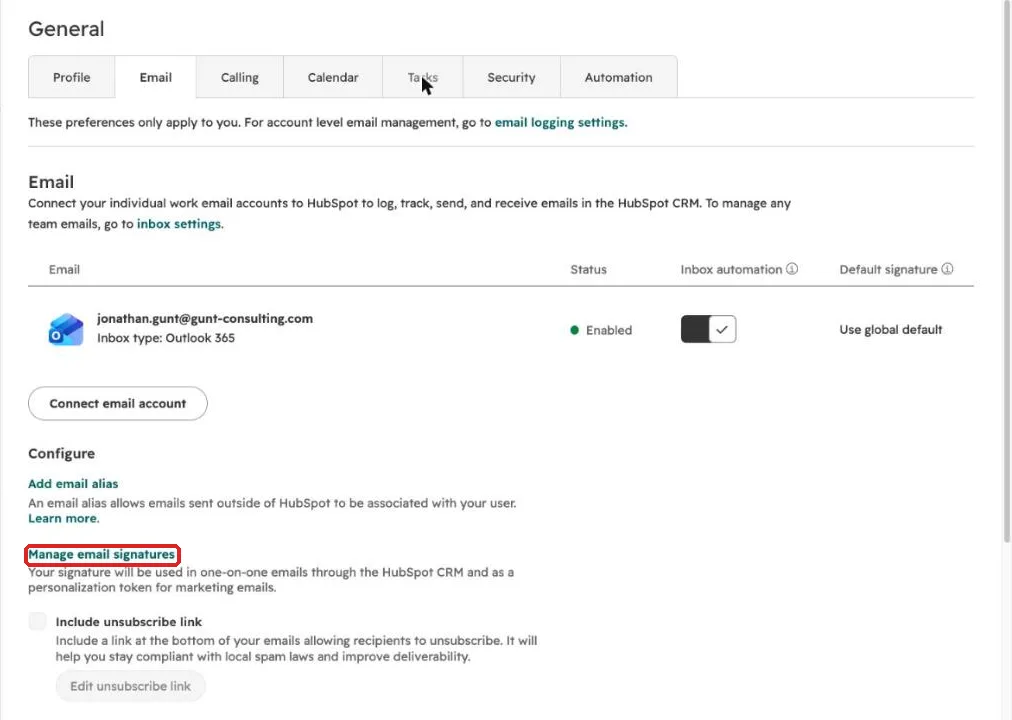
Click the gear icon at the top right, then Your Preferences, General, the Email tab, and “Manage email signatures”. The setting only applies to you.
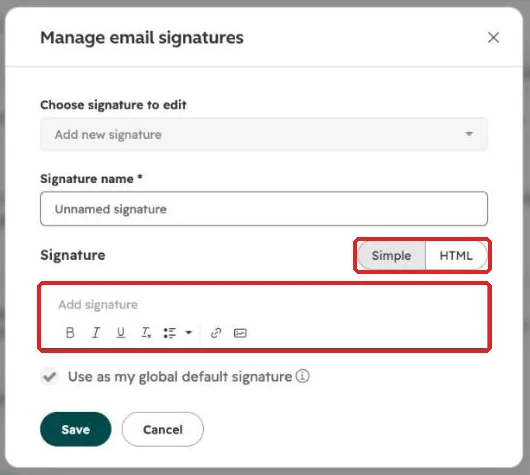
- Give the signature a name, for example “Default”.
- For a plain text signature, type directly into the field under “Simple”.
- For a logo, colors and links, build the signature in a signature generator, copy the HTML code and paste it under “HTML”.
- Keep “Use as my global default signature” checked and click Save.
Why does my signature look wrong after pasting it?
Because Outlook carries its own formatting along when you copy. Images go missing, spacing shifts, or the font suddenly changes. The reliable way is a generator, for example HubSpot’s free email signature generator, and the HTML code it gives you.
If your company uses one standard signature, ask for the HTML code. Then every signature looks the same, whether the email comes from Outlook or from HubSpot.
What belongs in a good signature?
Name, role, company, phone number and one link. Many teams add their HubSpot meeting link as “Book a time with me”. Customers then book a slot themselves, and the meeting lands on the right contact in the CRM automatically. How to create the link is covered in our article on the HubSpot meeting scheduler.
Keep it lean. Big banners and lots of images end up as attachments for some recipients or trigger spam filters.
Frequently asked questions
Is the signature used in the Outlook add-in too? Emails you write in Outlook with the HubSpot sidebar open use your Outlook signature. Emails you write directly in HubSpot use the HubSpot signature. The easiest setup is to keep both identical.
Can an admin set one signature for everyone? Each user manages their own signature. A shared HTML template that everyone fills with their name and number is the practical way.
Can I have more than one signature? Yes. Use “Choose signature to edit” to add more, for example a short one for replies.
Every step for your first week in HubSpot is in our guide on how to use HubSpot. Rolling HubSpot out to your team and want people to actually use it? Book a call with us.