With the meeting scheduler, customers book a time in your calendar themselves. No back and forth by email, and the meeting lands on the right contact in HubSpot automatically.
What do I need first?
A connected calendar. Under gear icon, Your Preferences, General, Calendar tab, check that your account is connected and that meeting scheduling pages are enabled. The calendar has to belong to the same address as your inbox in HubSpot.
How do I create my meeting link?
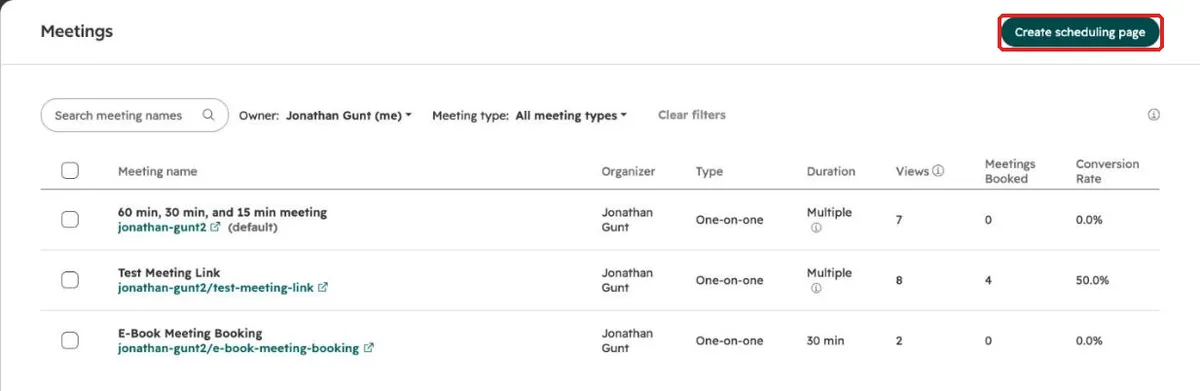
Open the meetings scheduler under Sales in the left menu and click “Create scheduling page”.
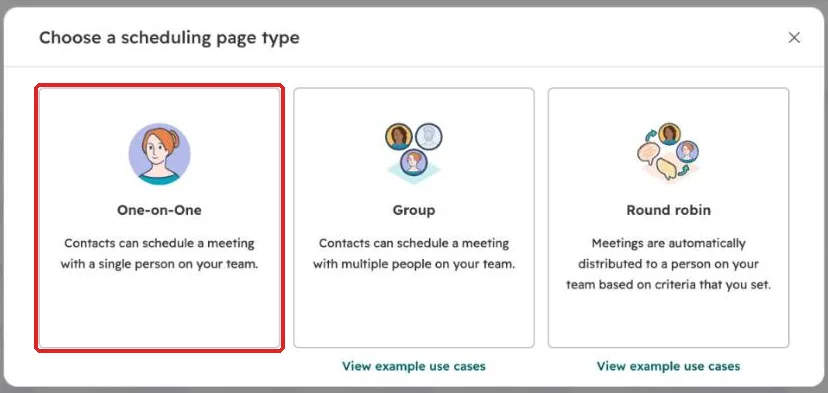
- Choose “One-on-One” for your own link.
- Overview: internal name, the title your customer sees, location. Adding a video conference link attaches Teams, Zoom or Google Meet automatically.
- Scheduling: the link ending, duration and your hours per weekday.
- Form: which details the customer enters when booking.
- Automation: confirmation and reminder emails to the customer. Save and copy the link.
Which settings are often forgotten?
Buffer time and minimum notice. Without a buffer, a customer books right after your last meeting. Without minimum notice, someone books a slot ten minutes from now. You’ll find both in the additional options of the scheduling step.
And the availability calendars: if you keep more than one calendar, select every calendar HubSpot should check before it shows a time as free.
Where do I use the link?
In your email signature as “Book a time with me”, in quote emails, and in the Outlook add-in, where you can drop it into any email with one click.
Frequently asked questions
Does it work in the free CRM? Yes, with one personal link that shows HubSpot branding. Group and round robin pages need Sales Hub or Service Hub Starter or higher.
What is a round robin page? One link for the whole team, where HubSpot gives each booking to an available colleague based on rules you set. Usually an admin sets this up.
Every step for your first week in HubSpot is in our guide on how to use HubSpot. Rolling HubSpot out to your team and want people to actually use it? Book a call with us.